FOCUS ON EC FAN ONLY
FOCUS ON EC FAN ONLY
Ventilation fans are essential for maintaining optimal air quality, humidity control, and overall comfort in both residential and industrial spaces. However, like any mechanical equipment, ventilation fans can encounter problems that affect their efficiency and performance over time. Whether you’re experiencing low airflow, excessive noise, or poor air circulation, understanding how to troubleshoot and maintain your ventilation fan can help improve its lifespan and functionality.
In this article, we’ll explore common ventilation fan problems and provide practical solutions for ventilation fan repair and maintenance to ensure your fans operate at peak efficiency.
Problem: One of the most common issues with ventilation fans is a significant decrease in airflow. If you notice that the fan is running but not moving air effectively, this can be due to several factors.
Possible Causes:
Clogged or dirty fan blades: Dust, dirt, and other debris can accumulate on the fan blades, causing the fan to lose efficiency.
Obstructions in the ductwork: Over time, ductwork can become clogged with dust or debris, restricting airflow.
Incorrect fan size: If the fan is too small for the space, it might not be able to move enough air to provide adequate ventilation.
Solution:
Clean the fan blades: Turn off the fan, and carefully remove dust, dirt, or debris from the blades using a soft brush or a vacuum cleaner with a brush attachment.
Check and clean the ductwork: Inspect the ducts for any blockages or dirt buildup. If you find any, clean them with a brush or hire a professional duct cleaning service.
Ensure proper fan sizing: If the fan is not moving enough air, consider upgrading to a higher capacity ventilation fan that is better suited to the size of the space.
Problem: Unusual or excessive noise coming from your ventilation fan can be annoying and may indicate underlying issues that need addressing.
Possible Causes:
Loose or damaged fan blades: Loose or cracked fan blades can cause rattling or grinding noises.
Debris in the fan motor: Debris or dirt in the motor can cause it to operate noisily.
Misalignment: If the fan blades or motor are misaligned, they can produce excessive noise when they rotate.
Worn-out bearings: Over time, the bearings in the fan motor can wear down, causing a loud, grinding sound.
Solution:
Tighten loose components: Inspect the fan blades and motor, tightening any loose screws or parts. Replace damaged fan blades if necessary.
Clean the motor: Dust and debris in the motor can cause it to operate noisily. Remove the fan cover, and carefully clean the motor using compressed air or a soft cloth.
Check for alignment: Ensure that the blades are properly aligned with the motor and the fan housing.
Lubricate or replace bearings: If the bearings are worn out, they may need to be lubricated or replaced. Consult the manufacturer’s manual for guidance on proper maintenance.
Problem: If your ventilation fan fails to turn on, it could be due to several factors such as electrical issues, motor problems, or faulty wiring.
Possible Causes:
Power supply issues: The fan may not be receiving power due to a blown fuse, tripped circuit breaker, or faulty wiring.
Faulty motor: If the motor is damaged, it may prevent the fan from starting.
Loose connections: Loose electrical connections can prevent the fan from receiving the necessary power to operate.
Solution:
Check the power supply: Ensure the fan is plugged in correctly and that there is no issue with the power supply. Check the circuit breaker to ensure it hasn’t tripped.
Inspect the motor: If the fan motor is faulty, it may need to be repaired or replaced. You may need to call a professional to fix or replace the motor.
Examine electrical connections: Make sure all wiring and connections are secure. If you’re unsure about electrical issues, consult a qualified electrician to avoid potential hazards.
Problem: If your ventilation fan is not improving air quality or removing odors effectively, this could indicate an issue with airflow, the fan motor, or filtration.
Possible Causes:
Dirty filters: If your fan has a filter, a dirty or clogged filter can impede airflow, reducing its ability to purify the air.
Improper fan placement: If the fan is poorly placed or too small for the space, it might not be effectively removing odors or improving air quality.
Fan motor failure: A malfunctioning motor can also lead to poor ventilation and ineffective odor removal.
Solution:
Replace or clean the filters: Regularly clean or replace the filters in your ventilation fan to ensure optimal air quality. Check the manufacturer’s guidelines for the correct cleaning or replacement schedule.
Ensure proper fan placement: Place the fan in an optimal location to maximize airflow and ventilation efficiency. For kitchens or bathrooms, consider a fan designed specifically for that space, such as a kitchen ventilation fan or bathroom exhaust fan.
Inspect the motor: If the fan motor is not running efficiently, it may need to be repaired or replaced.
Problem: If your ventilation fan is running constantly without shutting off, this could indicate a faulty switch or sensor.
Possible Causes:
Faulty timer or sensor: Many modern fans come equipped with a timer or humidity sensor that automatically turns the fan on or off. A malfunctioning sensor could cause the fan to run continuously.
Stuck switch: If the fan is controlled by a manual switch, the switch might be stuck in the “on” position.
Solution:
Inspect the timer or sensor: If your fan has a built-in timer or humidity sensor, check to see if it’s working correctly. If it’s malfunctioning, you may need to reset or replace the sensor or timer.
Check the switch: Ensure that the manual switch is functioning correctly. If the switch is faulty, it may need to be repaired or replaced.
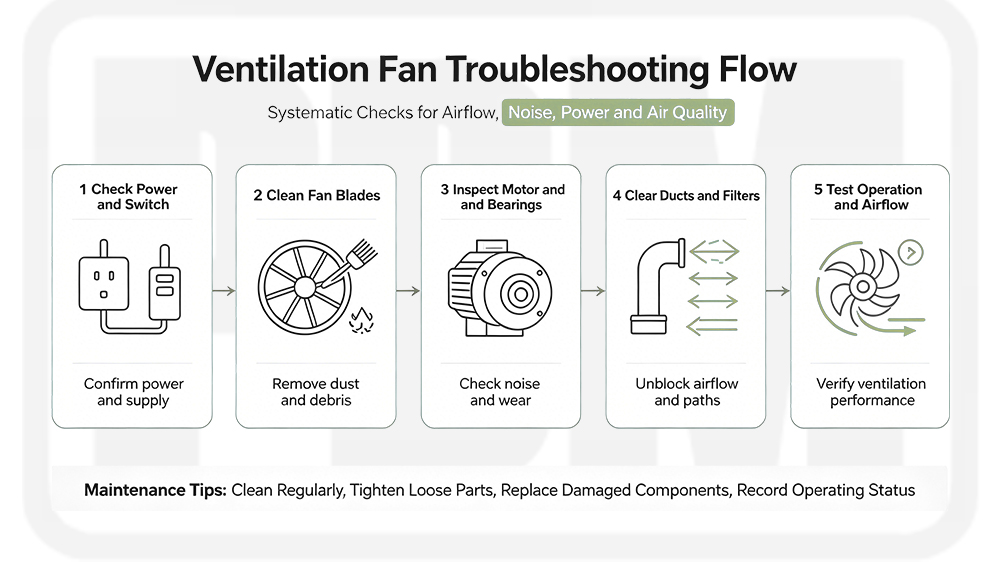
Regular maintenance is crucial for ensuring that your ventilation fan operates efficiently and lasts longer. Here are some tips for keeping your fan in top condition:
Regular Cleaning: Clean the fan blades, motor, and filters every few months to prevent dust buildup and ensure smooth operation.
Check for Obstructions: Periodically inspect the ductwork and vents for blockages, which can hinder airflow and reduce fan efficiency.
Lubricate Moving Parts: If applicable, lubricate the fan motor and bearings to keep them running smoothly.
Inspect Electrical Components: Check the fan’s wiring and electrical components for wear or damage, especially if you notice any issues with power supply or fan performance.
Replace Damaged Parts: If any parts, such as the fan blades or motor, are damaged, replace them promptly to avoid further damage to the fan or the surrounding area.
By identifying and addressing common ventilation fan problems, you can significantly improve the efficiency and lifespan of your fan. Regular ventilation fan maintenance and timely repair are essential for ensuring optimal airflow, reducing energy costs, and maintaining a comfortable environment. Whether you’re troubleshooting issues like low airflow, excessive noise, or poor performance, the solutions outlined in this guide can help restore your fan’s functionality.
If you need help with ventilation fan repair or are looking for new ventilation solutions, don’t hesitate to reach out to our team at PBM. We offer a wide range of high-quality ventilation fans for various applications, backed by expert support and advice.
 If you have any interest in our products,please feel free to contact us & we are ready to serve you

By continuing to use the site you agree to our privacy policy Terms and Conditions.