FOCUS ON EC FAN ONLY
FOCUS ON EC FAN ONLY
In today’s fast-paced, technology-driven world, the performance of your IT equipment, especially in server rooms and data centers, is crucial to business operations. One of the most common causes of IT equipment failure and poor performance is overheating, which can lead to hardware malfunctions, data loss, and system downtimes. Proper ventilation in computer rooms is essential to prevent overheating, extend the lifespan of your IT equipment, and optimize your system's performance.
In this article, we’ll discuss the importance of computer room ventilation, the risks of poor ventilation, and how you can optimize airflow to ensure the reliable performance of your servers, computers, and other IT equipment.
1. Prevents Overheating:
Servers and other computer equipment generate a significant amount of heat when running at full capacity. Without adequate ventilation, this heat can accumulate quickly and cause the internal components to overheat. Overheating can result in:
Hardware damage: Over time, excessive heat can damage the delicate internal components, leading to costly repairs or replacements.
Reduced performance: When IT equipment gets too hot, it can slow down and experience performance issues, affecting the efficiency of your systems.
Unexpected shutdowns: Overheating can trigger automatic shutdowns to protect equipment, causing system downtimes and interruptions.
2. Reduces Humidity Levels:
In addition to heat, excessive humidity can also cause problems in server rooms. High humidity can lead to condensation, which increases the risk of corrosion and short-circuiting of internal components. By optimizing computer room ventilation, you can reduce the chances of moisture buildup and ensure a stable environment for your equipment.
3. Extends Equipment Lifespan:
When your IT equipment is regularly exposed to high temperatures and humidity levels, its lifespan can be significantly shortened. Proper ventilation ensures a more consistent and optimal operating environment, allowing your servers and other equipment to function efficiently over a longer period. This can lead to reduced maintenance costs and fewer hardware failures.
4. Improves Energy Efficiency:
Efficient computer room ventilation not only helps maintain equipment health but also improves energy efficiency. When ventilation is properly optimized, there’s no need for excess cooling or the use of energy-hungry air conditioning systems. This helps reduce energy consumption and lowers operational costs.
Now that we understand the importance of computer room ventilation, let’s explore how you can optimize airflow in your server rooms and IT environments to ensure the best performance of your equipment.
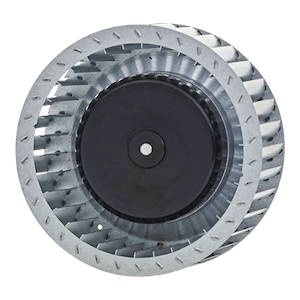
Ventilation fans are the backbone of any effective cooling system. To ensure optimal airflow in your computer room, you need to install high-efficiency ventilation fans that are specifically designed for IT environments. These fans work by drawing hot air out of the room and bringing in cooler air, helping to maintain a consistent temperature. When selecting fans, consider the following:
High airflow capacity (CFM): Ensure that the fans have enough airflow capacity (cubic feet per minute, or CFM) to circulate air efficiently within the room.
Quiet operation: IT environments require fans that run quietly to prevent disturbances. Look for low-noise ventilation fans that provide effective cooling without contributing to the overall noise level in the room.
Energy efficiency: Opt for energy-efficient ventilation fans to keep energy costs low while still maintaining effective airflow.
To optimize computer room ventilation, the design of the airflow system is critical. A well-designed airflow system ensures that cool air is directed towards the equipment’s intake vents while hot air is drawn out efficiently. Consider the following tips for airflow management:
Hot aisle/cold aisle configuration: Arrange your server racks in a hot aisle/cold aisle setup. In this layout, cold air is supplied to the front of the racks, while hot air is expelled at the back. This setup prevents the mixing of hot and cold air, making the cooling process more efficient.
Containment systems: Use containment systems such as hot or cold aisle containment to prevent hot air from circulating back into the cooling zone. These systems isolate hot air from the cold air, improving cooling efficiency.
Raised floors: Raised floors are an effective solution for circulating air beneath the server racks. This allows cool air to flow directly to the equipment, reducing the need for large air conditioning units.
Temperature and humidity monitoring are crucial for understanding the environment in your computer room. By using temperature sensors and humidity control systems, you can maintain a stable environment and ensure your equipment is operating within safe parameters.
Temperature sensors: Install temperature sensors near equipment and in the return air ducts to monitor and adjust the temperature.
Humidity control: Humidity levels should be kept within an optimal range of 40-60%. Install humidifiers or dehumidifiers if necessary to prevent condensation and maintain a stable environment.
Another way to optimize computer room ventilation is by using dedicated hot/cold air distribution systems. These systems use airflow ducts or air distribution units to direct cool air precisely where it's needed and remove hot air efficiently. This improves the overall cooling efficiency and reduces the workload on your ventilation fans.
Regular maintenance is essential to ensure your computer room ventilation fans are working at their best. Dust and debris can accumulate in fans, filters, and ducts, reducing airflow and causing your fans to work harder. Clean the ventilation system, replace filters regularly, and inspect fans to ensure they are running efficiently.
To maximize the performance and longevity of your IT equipment, here are some best practices for computer room ventilation:
Invest in dedicated computer room air conditioning units: While ventilation fans are essential, sometimes additional cooling is necessary. Computer room air conditioners (CRACs) can help regulate temperature and provide extra cooling.
Ensure proper cable management: Cables can obstruct airflow and create hot spots. Use cable management systems to organize cables and avoid blocking airflow.
Monitor airflow regularly: Use airflow management tools to monitor air circulation within the room and identify any areas that may require additional cooling.
Optimizing computer room ventilation is essential for ensuring the optimal performance and longevity of your IT equipment. By using the right computer ventilation fans, implementing effective airflow designs, and maintaining the right temperature and humidity levels, you can prevent overheating, reduce energy costs, and extend the lifespan of your servers, computers, and other IT devices.
At PBM, we offer a range of high-quality computer room ventilation fans designed to provide efficient and reliable cooling for IT environments. Our fans are engineered to ensure quiet operation, high airflow, and energy efficiency, making them ideal for optimizing computer room ventilation. Contact us today to learn more about how our computer ventilation fans can help keep your IT equipment running smoothly.
 If you have any interest in our products,please feel free to contact us & we are ready to serve you

By continuing to use the site you agree to our privacy policy Terms and Conditions.